
A slow WordPress site doesn’t usually announce itself with a dramatic crash — it just quietly costs you visitors, sales, and rankings every single day. Half of all users now expect a site to load in two seconds or less, and WordPress sites average roughly 13 seconds to load on mobile, well past the point where most visitors have already left. If any of the seven signs below sound familiar, it’s worth treating a speed audit as urgent rather than optional.
1. Your Bounce Rate Climbs the Longer Pages Take to Load
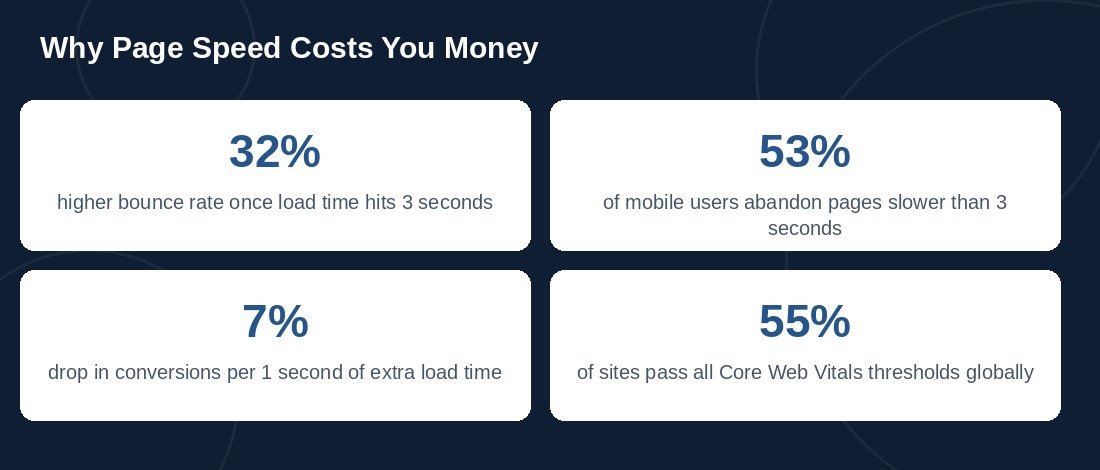
The math here is brutal: bounce rates jump by roughly 32% once load time hits 3 seconds, and by around 90% once it reaches 5 seconds. If your analytics show visitors leaving within seconds of arriving — especially on mobile — slow load time is the first thing to rule out, not the last.
2. You Fail Google’s Core Web Vitals Report
Search Console’s Core Web Vitals report is one of the clearest health checks available. Globally, only around 55% of websites currently pass all three Core Web Vitals thresholds (LCP, INP, and CLS), and mobile pass rates lag desktop by several points. If your report shows pages flagged “Poor” or “Needs Improvement,” Google is already treating your site as slower than a meaningful share of the competition.
3. Every New Plugin Seems to Slow Things Down Further
Plugins are the single biggest source of WordPress bloat — each one adds its own scripts, stylesheets, and database queries, and most sites accumulate far more plugins than they actually need over time. If you’ve noticed the site getting sluggish every time a new plugin is installed, that’s a sign your current stack needs an audit, not just one more caching plugin layered on top.
4. Images Take Forever to Appear, Even on Fast Connections
Images make up roughly 78% of the average webpage’s total weight, and they’re responsible for the majority of Largest Contentful Paint (LCP) problems — the metric that measures how fast your main content becomes visible. Unoptimized, uncompressed, or non-lazy-loaded images are one of the most common — and most fixable — causes of a slow WordPress site.
5. Your Hosting Plan Hasn’t Changed Since You Had a Fraction of the Traffic
A shared hosting plan that worked fine at launch often becomes the bottleneck once real traffic arrives. If load times get noticeably worse during busy periods, or your host’s own dashboard shows CPU or memory limits being hit, no amount of front-end optimization will fully fix a server that’s simply undersized for the job.
6. Cart Abandonment or Form Drop-Off Is Higher Than It Should Be
Speed problems don’t just cost pageviews — they cost revenue directly. A one-second delay in page load has been shown to reduce conversions by around 7%, and mobile shoppers are especially unforgiving: roughly 53% will abandon a page that takes longer than 3 seconds to load. If checkout or lead-form completion rates are underperforming and you can’t explain why, page speed deserves a hard look before you touch the funnel itself.
7. You’ve Never Actually Run a Real Performance Audit
This sounds obvious, but it’s the most common one. Many site owners have never gone past a single PageSpeed Insights score and instead rely on the site “feeling fine” on their own fast office connection. A proper audit tests real-world conditions — mobile networks, different devices, multiple pages, not just the homepage — and traces problems back to their actual cause: unused CSS and JavaScript, render-blocking resources, an oversized database, or a theme doing far more than it needs to.
What a Real Speed Audit Should Cover
A proper audit goes beyond installing a caching plugin. It should look at server response time and hosting quality, image compression and lazy loading, unused and render-blocking CSS/JavaScript, database cleanup, and a Core Web Vitals breakdown for both mobile and desktop. Fixing the symptoms without diagnosing the cause usually means paying for the same problem twice.
How Danovate Solutions Can Help
We run full WordPress speed audits as part of our WordPress Speed & Performance Optimization service — diagnosing the real cause of slow load times rather than just papering over it with another plugin. If any of the seven signs above sound like your site, get in touch and we’ll show you exactly where the time is going.